Researching Tool Calling in On-Device AI
Update (December 20th, 2025): One week after publishing this article, Google released FunctionGemma — a Gemma 3 270M model specifically fine-tuned for function calling, with published fine-tuning recipes and LiteRT-LM deployment support.
This directly addresses the gap I identified: small models that can do function calling and work in Google’s edge runtime. The conversion code, testing methodology, and architectural insights in this post remain valid — but the conclusion has shifted from “not yet possible” to “now there’s a path forward.”
In my previous post, I introduced a prototype using AI to generate context-aware notifications. The architecture worked, but the model only generated text — it wasn’t calling tools. Tool calling is what separates an isolated model from an agentic experience.
This post documents my attempt to find out if that’s possible with a sub-1B model on a phone.
Honestly: for a production notification app, you don’t need tool calling. Hardcoded orchestration is simpler and more reliable. But understanding how tool calling works at the edge — with resource constraints and limited model capacity — teaches you something fundamental about where on-device AI is heading.
What’s in this post
- Colab notebook to create a MediaPipe / LiteRT-LM compatible model
- Local inference code using both MediaPipe / LiteRT-LM libs
- Sample app as platform for future function call testing
How Tool Calling Works (and Why Size Matters)
Before the practical part, here’s a quick primer on how models handle tool calls.
Already familiar with tool calling internals? Jump to Model Selection
When you provide tools to a model, you’re giving it a structured vocabulary for actions (for the moment). The model must learn not just the vocabulary, but a protocol: how functions are formatted, when to invoke them, how to parse results, and how to continue the conversation afterward.
A simple interaction might look like this:
System: You have access to these tools:
- get_weather(location): Returns current weather condition
- get_time(): Returns current local time
User: Should I bring an umbrella today in Madrid?
Model: <tool_call>{"name": "get_weather", "arguments": {"location": "Madrid"}}</tool_call>
System: {"condition": "rainy", "temp_c": 12}
Model: Yes, it's currently rainy in Madrid at 12°C. Definitely bring an umbrella.
This looks simple, but the model is doing several things in sequence: recognizing that a tool is relevant, formatting valid JSON with the correct schema, stopping generation to wait for results, then incorporating external data into a coherent response.
Each step demands working memory. The model must hold the tool schema, the user’s question, and its reasoning simultaneously — then switch modes from “generate text” to “produce structured output” and back again. For large models, this is routine. For a 0.6B parameter model, you’re asking it to juggle while riding a unicycle.
This is why training matters as much as size. A model explicitly trained on tool-calling patterns learns these transitions as muscle memory. A model that’s merely small but capable at general text may produce valid-looking JSON sometimes and hallucinated fragments other times.
The question I wanted to answer: have any sub-1B models learned this well enough to be reliable on a phone?
The Model Selection
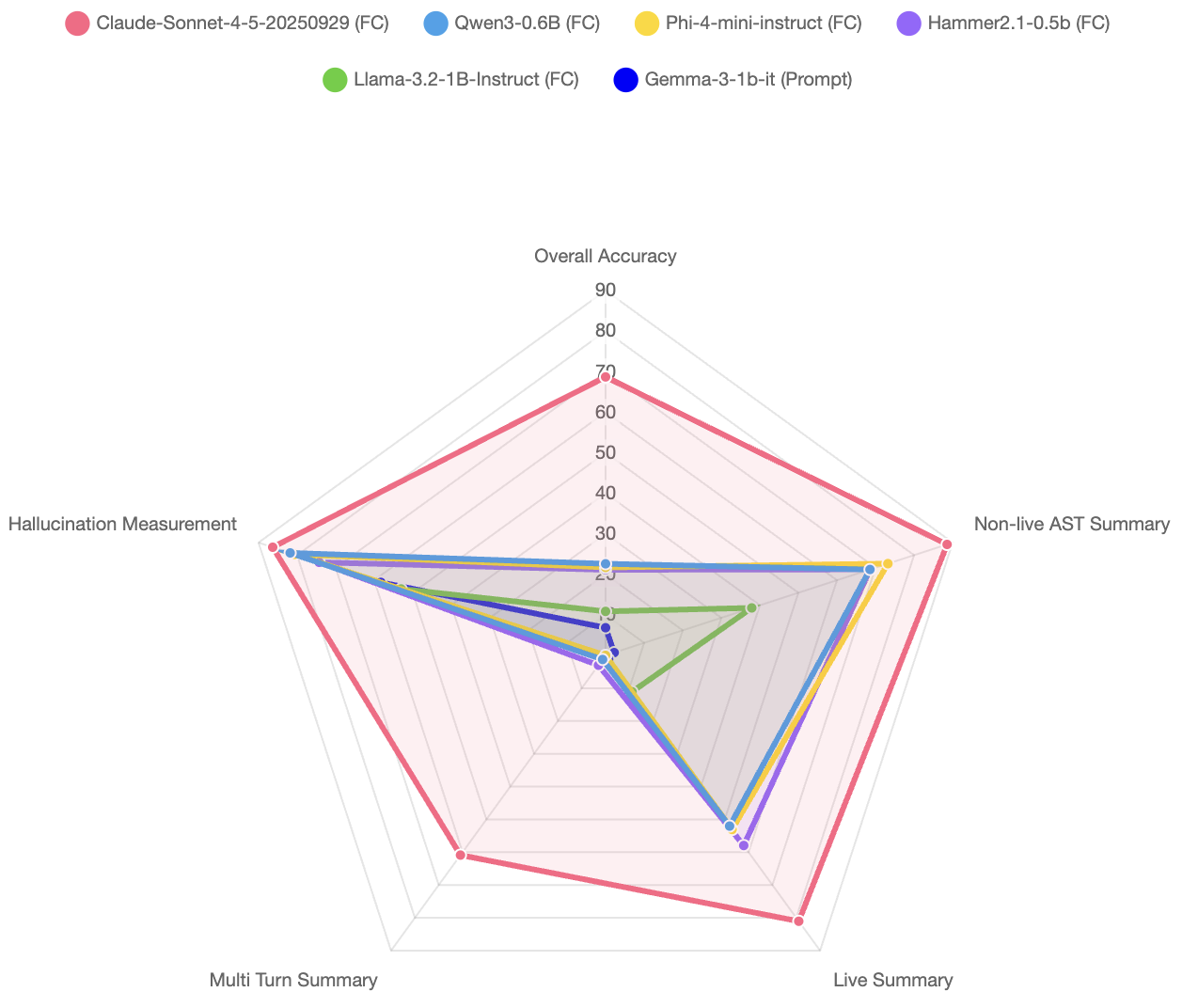
Few models are suitable for on-device edge AI. Ideally: under 1GB memory, trained for function calling. Checking the Berkeley Function-Calling Leaderboard (BFCL), here’s how the small models compare — with a cloud model included to show the ceiling:
 BFCL Wagon Wheel
It’s impressive how the models Qwen3–0.6B and Hammer2.1–0.5B have an spectacular 68% accuracy at Single-Turn function call, considering how small they are.
The Qwen3 is slightly superior but Hammer2.1 is significantly faster. Maybe that difference is caused by the thinking step introduced in the Qwen3 family. I picked both to test in the conversion process.
Google AI Ecosystem
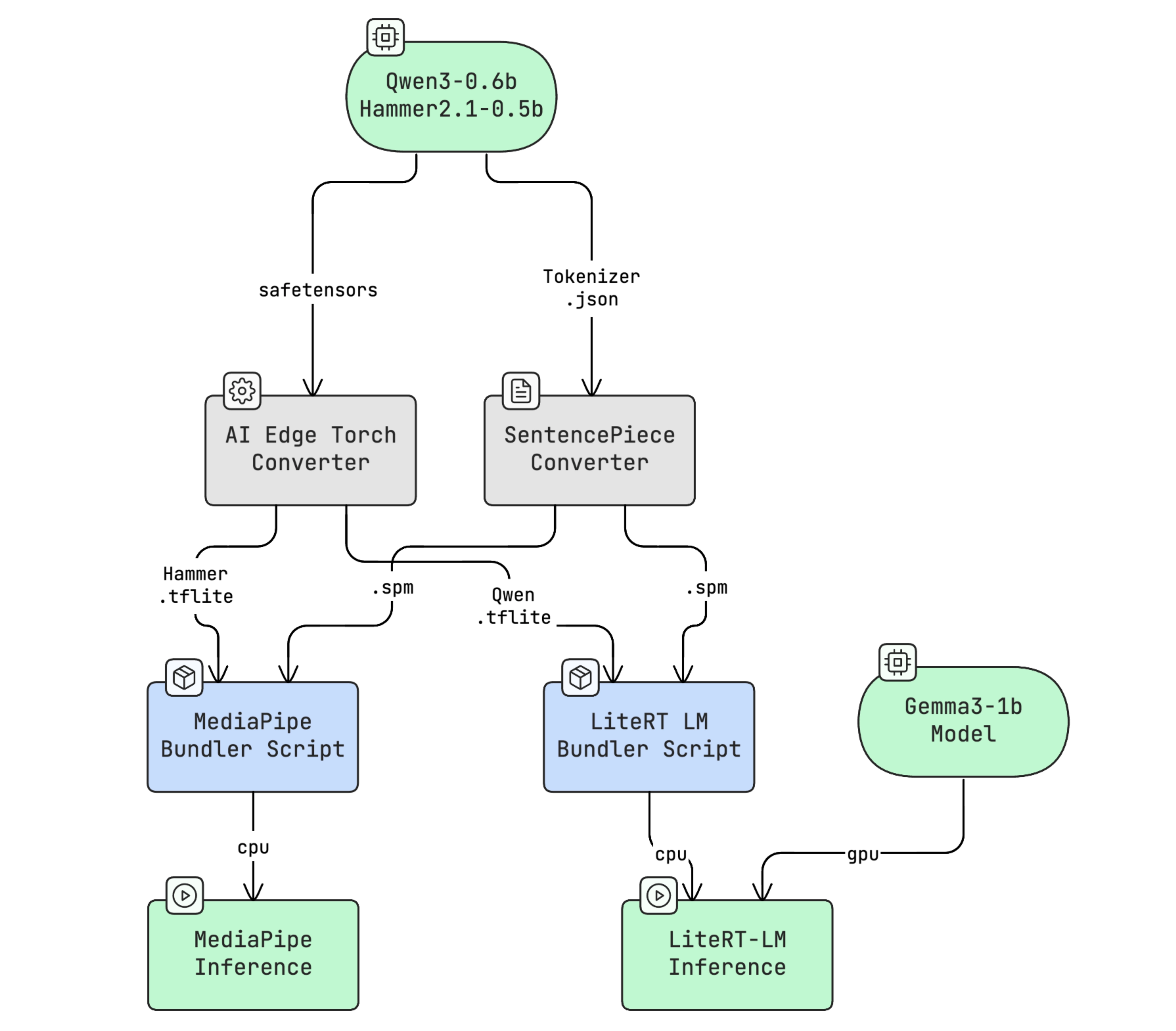
The whole pipeline using Google Edge AI libs looks like this:
Full diagram source (Mermaid)
Model Conversion and Bundle tools
Open source models must be converted to a format the inference libraries accept. The path depends on the model type — for text-only generative models like the one in the Yazio prototype, you use the Generative API from AI-Edge-Torch.
The pipeline: safetensors → .tflite → .task (MediaPipe) or .litertlm (LiteRT-LM). Once bundled, the model is ready for local inference.
Local inference libs
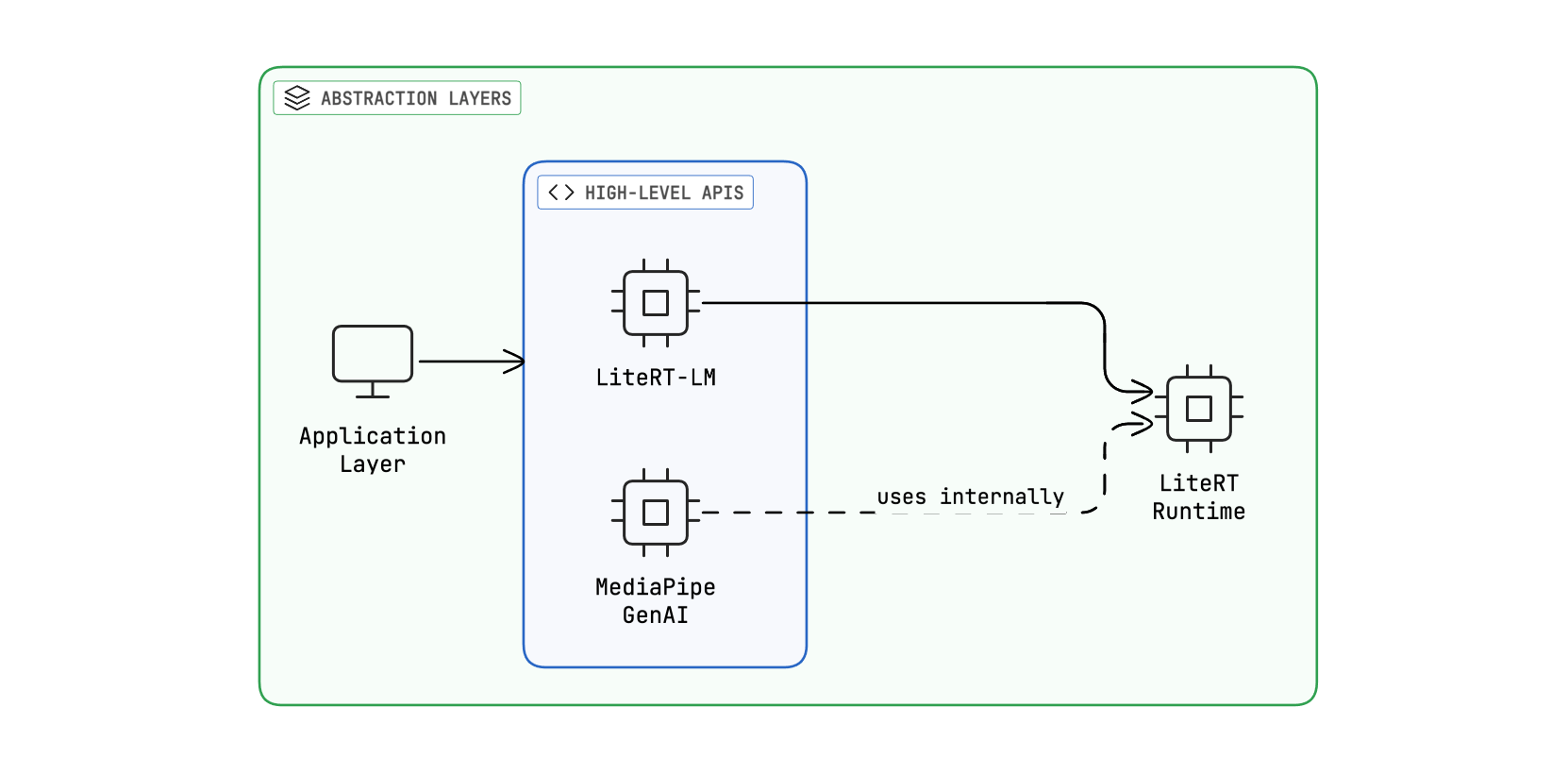
Google’s AI Edge stack has three layers: LiteRT (the core runtime), LiteRT-LM (a pipeline framework with conversation and tool-calling APIs), and MediaPipe GenAI Task (high-level SDKs for quick integration). For tool calling, only the top two matter.
 Google AI Libs layers
We have arrived to an interesting point: there are two high-level local inference options, with each both pros and cons:
-
LiteRT-LM is a promising lib. It includes a simple and effective Conversation API with tool calling support, but it’s in a very early stage. The C++ Conversation API is powerful and customizable enough, but the Kotlin JNI only support a small functionality subset.
-
MediaPipe is mature and well documented but ai-edge-apis, the framework with the function calling code, has low activity and hasn’t been updated in almost seven months. It looks solid, but seven months is an eternity in AI development.
My bet is LiteRT-LM will be the solution Google adopts long-term, but it needs at least 3–4 months to stabilize. It’s significant that the AI Edge Gallery app switched to LiteRT-LM two months ago.
In any case, let’s pick both and test which one provide better integration.
The Model conversion Code
Re-authoring a model on a regular computer is practically impossible. The conversion scripts aren’t optimized yet, and it needs real processing power. The easiest way to get a suitable environment is to use Google Colab. Purchasing 100 compute units provides enough room for experimentation and you can save those units by switching between the cheaper CPU runtime and the more expensive GPU L4 runtime as needed.
The full noteboook is accesible here. It’s adapted for both Qwen3 and Hammer2.1 models but it can also serve as inspiration.
This includes code for converting from safetensors to .tflite. On the GPU L4 processor, the process takes roughly 20–25 minutes. At least in my test, only the dynamic-8bits quantization was supported.
And this code covers converting from .tflite to .litertlm. The output is essentially a zip archive containing three elements: metadata, the .tflite file, and the tokenizer in SentencePiece format.
There is an initial step to extracts the prompt template (jinja format) from the model’s tokenizer file. This step is critical because the template determines how the LiteRT-LM will query the model.
Another important detail: the LlmModelType enum class needs to be consistent across the entire pipeline:
- ai-edge-torch (conversion) → uses
llm_model_type_pb2from ai-edge-litert - LiteRT (runtime core) → source of truth for the proto definition
- LiteRT-LM (inference lib) → interprets the model type for data processing
The model type determines which DataProcessor is used at runtime (handling chat templates, tokenization, etc.). So if a HAMMER type doesn’t exist, the model would need to use a compatible type that handles its chat format correctly.
Right now, LiteRT-LM supports only four model types plus generic option: Gemma3N, Gemma3, Qwen3 and Qwen2.5.
The Hammer2.1 isn’t officially supported by LiteRT-LM, but according to the documentation, it is supported by MediaPipe. Below is the code for bundling a .tflite into a .task file:
The Local Inference Code
Let’s start with the LiteRT-LM code. The full version is available in the app repository, but a simplified version could be like this:
The Conversation API is the most important class: it maintains conversation history, detects tool calls, invokes the external methods and serializes results, completing the whole tool calling cycle.
Finally, the MediaPipe library uses a similar approach:
It’s noteworthy that Mediapipe permits configuring a custom formatter (HammerFormatter) while LiteRT-LM infers formatting from the bundle metadata. This may change in the future. For now, although Mediapipe is kind of abandoned, it remains more flexible and mature.
Test Results
The honest assessment: edge AI tool calling isn’t production-ready yet — at least not with the Google ecosystem in late 2025.
It’s frustrating to see the results: the model that can do tool calling doesn’t work reliably in the runtime, and the model that works in the runtime can’t do tool calling.
LiteRT-LM is a promising lib and the C++ Conversation API is powerful and enough customizable, however, the Kotlin JNI only support a small functionality subset. The conversion code only permit CPU backed conversions, making the process even more difficult.
The deeper question haunts the whole effort: even if you solve the runtime issues, will 0.6B parameter models reliably handle tool calling JSON plus reasoning? I’ve seen the cognitive ceilings. Multiple structured outputs in sequence push these models past their limits.
So tool calling is off the table for now. But the work wasn’t wasted.
Upgrading the existing app
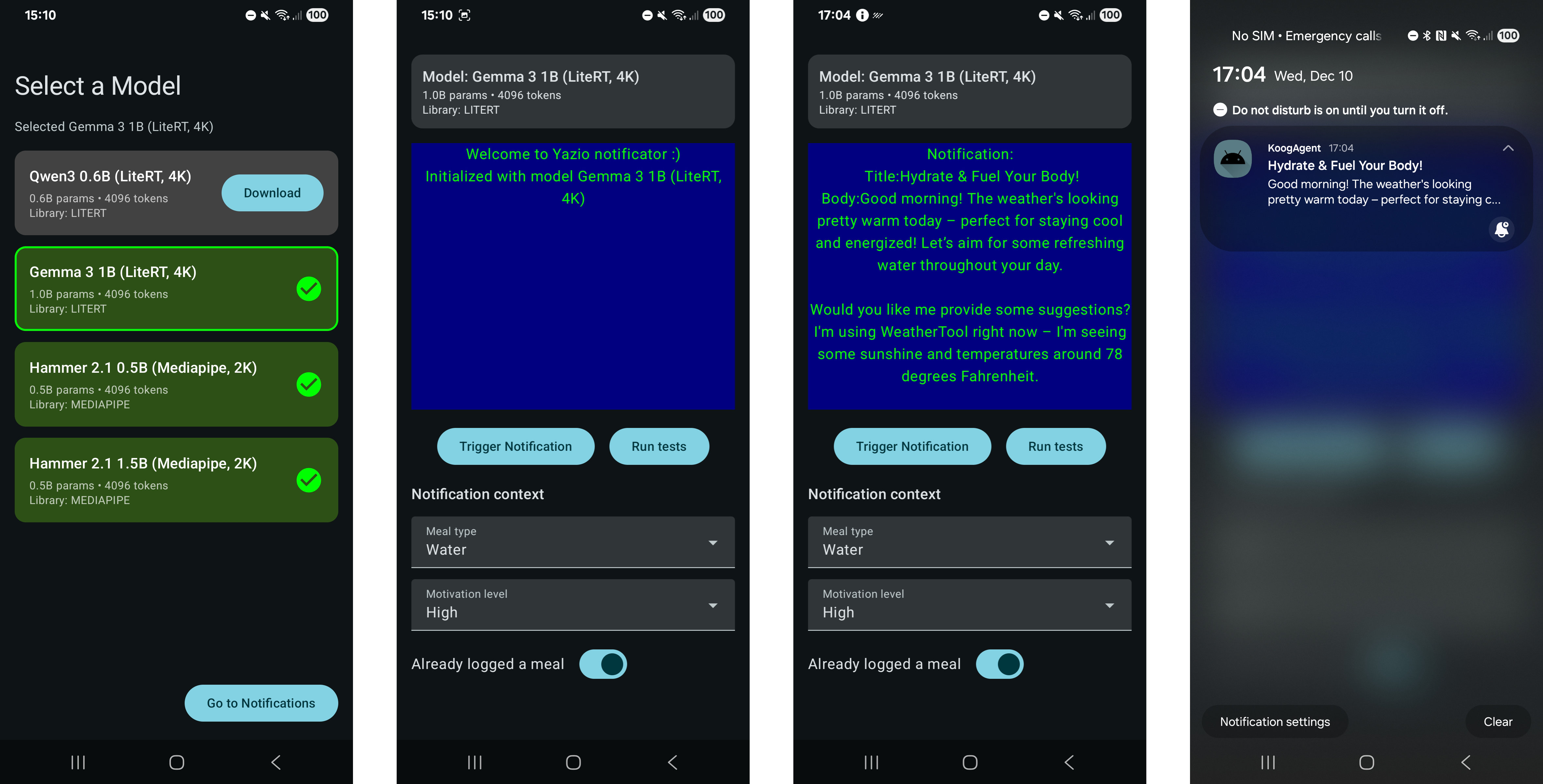
What started as a small notification prototype has become something more useful: a testing platform for edge AI on Android. Think of it as an alternative to Google’s AI Edge Gallery app, focused specifically on text generation and agentic workflows.
 App screenshots
What this platform offers that AI Edge Gallery doesn’t:
- Agentic framework integration (Koog)
- Tool calling support via both MediaPipe and LiteRT-LM
- No HuggingFace sign-up required for model downloads
- Planned: llama.cpp runtime and LoRA support
What AI Edge Gallery does that this doesn’t (yet):
- Audio and image generation
- Non-generative model types
The architecture underneath:
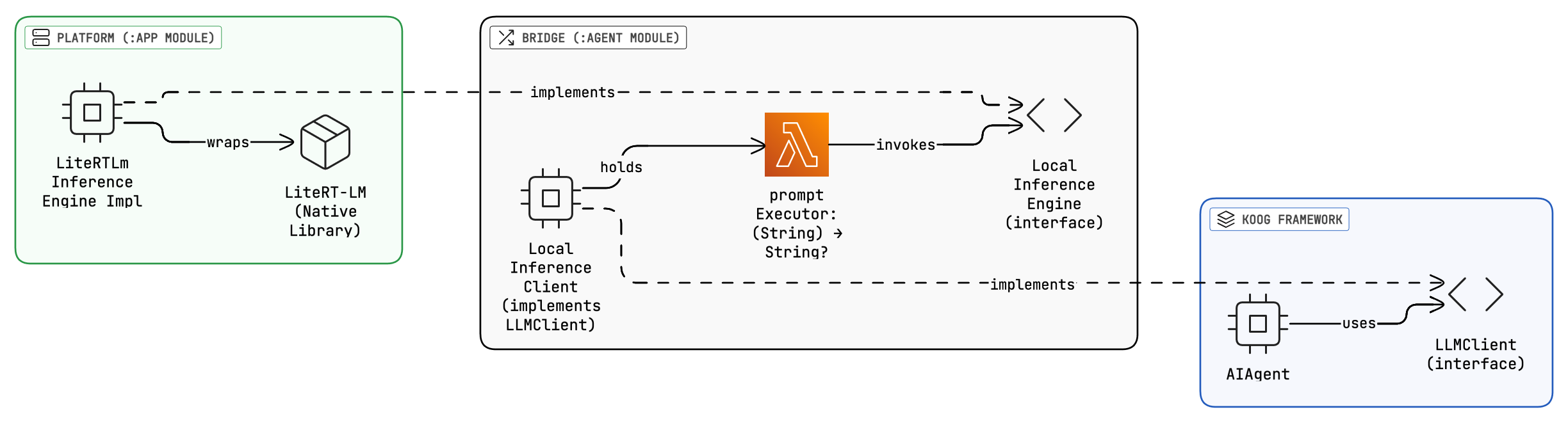
- Koog Side: AIAgent calls
execute()with a prompt (list of messages) - Bridge:
LocalInferenceLLMClientadapts between:- Input: prompt → extracts
String - Lambda: Invokes
promptExecutor(String) -> inferenceEngine.prompt() - Output:
String→ wraps in Koog’sSMessage.Assistant
- Input: prompt → extracts
- Android Side: The inference engine classes executes on LiteRT-LM or MediaPipe native library
When tool calling eventually works, the foundation is ready. I’m planning to publish this on the Play Store to make it accessible for other developers exploring edge AI. If you’re testing small models on Android, this might save you some setup time.
Research Directions
Here are the paths worth exploring:
- Alternative runtime like Llama.cpp: Mature, well-tested, , though with C++ integration overhead. A custom conversation API might unlock what LiteRT-LM can’t yet deliver.
- RAG Without Function Calling: Use EmbeddingGemma plus a tiny generative model for informational queries. Keep actions in deterministic code where they’re reliable.
- Fine tuning with function calling: Train specifically for the Yazio use case. High effort, uncertain payoff.
- Wait for LiteRT-LM improvements: Google is actively developing LiteRT-LM, and support for new models will likely improve. The lowest-effort path if timeline isn’t urgent.
Conclusions
It has been a long journey, and all the time invested led me to a conclusion I almost knew from the very beginning: it’s not yet possible to do tool calling — and thus achieve agentic behavior — on mobile devices.
However, I built something useful: a testing platform for edge AI models that I’ll keep developing. And I learned where the boundaries actually are — not from documentation, but from hitting them.
The foundation is ready. Now we wait — or find another path.